
How the Strategy Builder Works
Two builders sit on one screen, and they are not two products. Both feed the same five-stage engine — universe, eligibility, ranking, selection, rebalance — and every setting in either one attaches to exactly one of those stages.
What You’ll Learn
By the end of this article, you’ll understand:
- Why Quick and Custom are one engine, not two products
- The five stages every strategy runs through, in order
- Which stage each builder setting attaches to
- How a plain-English idea becomes universe, filters, ranking and portfolio rules
- Why the builder produces rules rather than predictions
- What happens to a strategy once it is built
What the Strategy Builder is for
The Strategy Builder does one thing: it turns an investment idea into explicit, repeatable rules.
That word repeatable is carrying the weight. An idea held in your head is applied differently on a calm Tuesday than on a day the market has fallen four percent. The same idea written as rules is applied identically on both, because nothing is left to be decided in the moment.
What comes out is a strategy — a specification. It is the starting point for a backtest, and later for a simulation. Nothing in the builder buys or sells anything, and no rule you write here reaches a broker.
Five stages, always in the same order
Whatever you configure, and whichever builder you use, a strategy runs the same pipeline. Each stage hands its output to the next.
How a strategy turns a market into a portfolio
- UniverseWhich stocks may be considered at all
- EligibilityWhich of those qualify today, on size, tradability and technical rules
- RankingThe qualifying stocks put in order, best first — by whatever 'best' has been set to mean
- Selection & allocationHow far down that order to go, and how capital is spread
- RebalanceThe whole thing runs again on schedule
The order is not arbitrary, and it explains a lot of behaviour that otherwise looks strange. A stock cannot be ranked if it was never eligible. A stock cannot be bought if the ranking put it below the number of holdings you asked for. And none of it changes until the next scheduled rebalance, however dramatic the week has been.
Notice what the pipeline does not contain: any stage where the strategy forms a view about a company. It narrows, orders, and selects. That is the whole of it.
Where every setting attaches
Once you can see the five stages, both builders become readable — every control belongs to exactly one of them.
| Stage | What it decides | Quick Strategy sets it through | Custom Strategy Builder controls |
|---|---|---|---|
| Universe | Which stocks are in scope | Risk Level | Universe |
| Eligibility | Which qualify today | Risk Level · Strategy Speed | Market Cap · Liquidity · 52 Week High Filter · the penny-stock and T2T checkboxes |
| Ranking | What "best" means | Strategy Speed | Moving Averages · ROC Filters · Ranking Method · Super Trend Filter |
| Selection | How many holdings, and when one is dropped | Risk Level · both together | Number of Stocks · Exit Rank · Investment Mode · Stop Loss Settings |
| Rebalance | How often it all runs again | Rebalance Frequency | Rebalance Frequency · Rebalance Day or Date · Exit Delay |
The mapping is not perfectly tidy, and that is worth seeing rather than smoothing over. The 52 Week High Filter is an eligibility rule, but in a Quick Strategy it moves with Strategy Speed rather than Risk Level. Exit Rank is the one setting both Quick dials influence together. Everything else divides cleanly: Risk Level decides the opportunity set, Strategy Speed decides the signal.
Two builders, one engine
The Create a New Strategy screen opens on a two-tab switch — Quick Strategy, marked Unlimited because it spends no Strategy credits, and Custom Strategy.
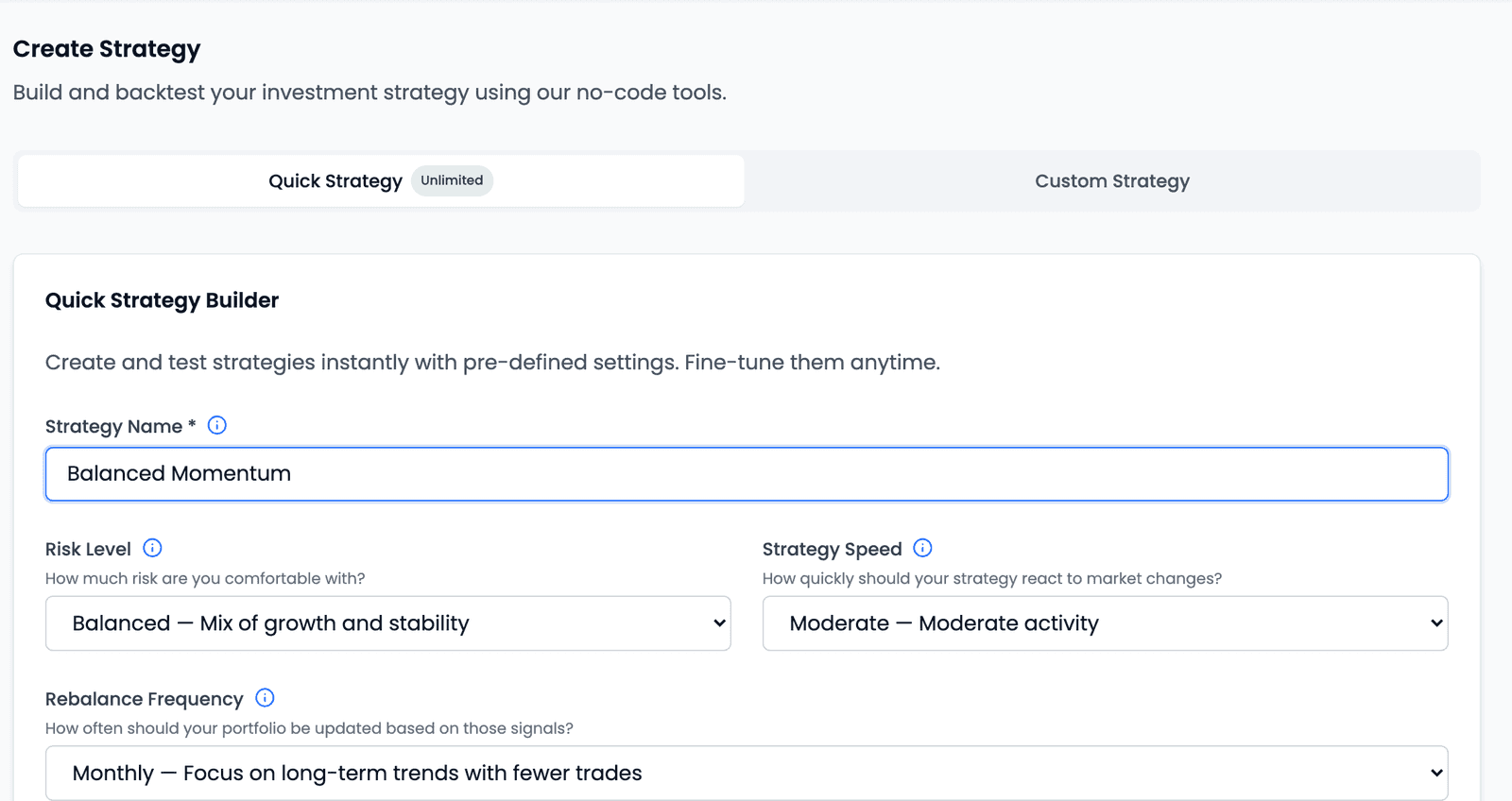
It is easy to read those tabs as two different products, or to assume Custom is the serious one and Quick is the toy version. Neither is true. They are the same five stages. The difference is only how many of the dials you set yourself.
Quick Strategy asks three questions — Risk Level, Strategy Speed, Rebalance Frequency — and fills in everything else from a defined mapping. Its subtitle says so plainly: "Create and test strategies instantly with pre-defined settings. Fine-tune them anytime." The button reads Review & Run Backtest, which tells you where it is pointed.
Custom Strategy opens the Custom Strategy Builder, a five-step wizard — Universe & Filters, Technical Rules, Portfolio Settings, Backtest Settings, Review — that hands you the controls directly. Each backtest run from it spends one Strategy credit.
The important part is that the two are connected, not parallel. A quick strategy opened with Customize lands in the Custom Strategy Builder with its presets already populated, every one of them editable (re-running it is a Custom backtest, so it spends one Strategy credit). So the Quick Strategy is a reasonable place to start even if you intend to configure things yourself: it gives you a working configuration to react to, rather than an empty form to fill.
What the Quick Strategy does not do is make a choice on your behalf that has no cost. Its option labels are written as trade-offs — Aggressive — Higher returns, higher volatility, Fast — Faster reaction, more trades. Each names an upside and its price together, and quoting only the first half would turn a trade-off into a promise.
An idea, translated
Here is what the pipeline looks like from the other direction. Suppose the idea you actually have sounds like this:
I want to hold about 20 of the larger listed companies that have been going up, and review it once a month.
That sentence is already a strategy. Every clause lands somewhere.
"the larger listed companies" is two stages at once. Which list to draw from
is the Universe — one of nine indices, from Nifty 50 up to
Nifty Total Market 750. How large is a Market Cap floor applied on top.
They sound like the same decision and are not: a broad index with a high market-cap
floor and a narrow index with none can produce overlapping sets by very different
routes.
The clause you did not say is eligibility too. You presumably meant companies you could actually buy and sell without moving the price — which is Liquidity, measured as 20-day average traded value. Almost nobody says this part out loud, and leaving it out is how a strategy ends up holding something it cannot exit.
"that have been going up" is the Ranking stage, and it is the vaguest
clause in the sentence. Going up over what period — three months, or twelve? And
does a stock that rose 40% with violent swings beat one that rose 30% steadily?
That second question is the Ranking Method, which is either Absolute Returns
or Volatility Adjusted Returns, and the same universe ranked the two ways gives
you two different portfolios.
"about 20" is Number of Stocks, and it quietly sets your position size too — twenty holdings is roughly 5% each.
"review it once a month" is Rebalance Frequency. It is the setting people underestimate most, because it decides not just how often the portfolio changes but how long a decision stays wrong before the rules get a chance to fix it.
Five stages, one sentence, no jargon in the original. The builder's job is to make you say the parts you left out.
What the builder will not do
Four honest boundaries
It has no fundamental filters
The scope is technical and price-based — moving averages, rate of change, trend, size and tradability. There is no P/E, ROE, earnings, revenue or debt filter, and a strategy cannot be built on one.
It builds rules, it does not act
Nothing here places an order or touches a brokerage account. The builder produces a specification; a backtest tests it; a simulation follows it forward. Every real decision stays yours.
No setting is the safe one
Faster reacts sooner and is wrong more often. A tighter filter admits fewer candidates and may exclude good ones. These are trade-offs, not quality dials, and the product describes them that way.
A strategy is not a prediction
Rules say what to do when a condition is met. They say nothing about whether the condition will occur, or whether the result will resemble anything the past showed.
What happens after you build
Both paths end by pointing at evidence rather than at a result.
Quick Strategy goes straight there — Review & Run Backtest is a single step from configuration to historical evaluation. The Custom Strategy Builder finishes on its Review step, whose Run Backtest button creates the strategy and runs its backtest in one action, after confirming that it will spend one Strategy credit.
Either way the strategy is now a saved object, and it lives on My Strategies.
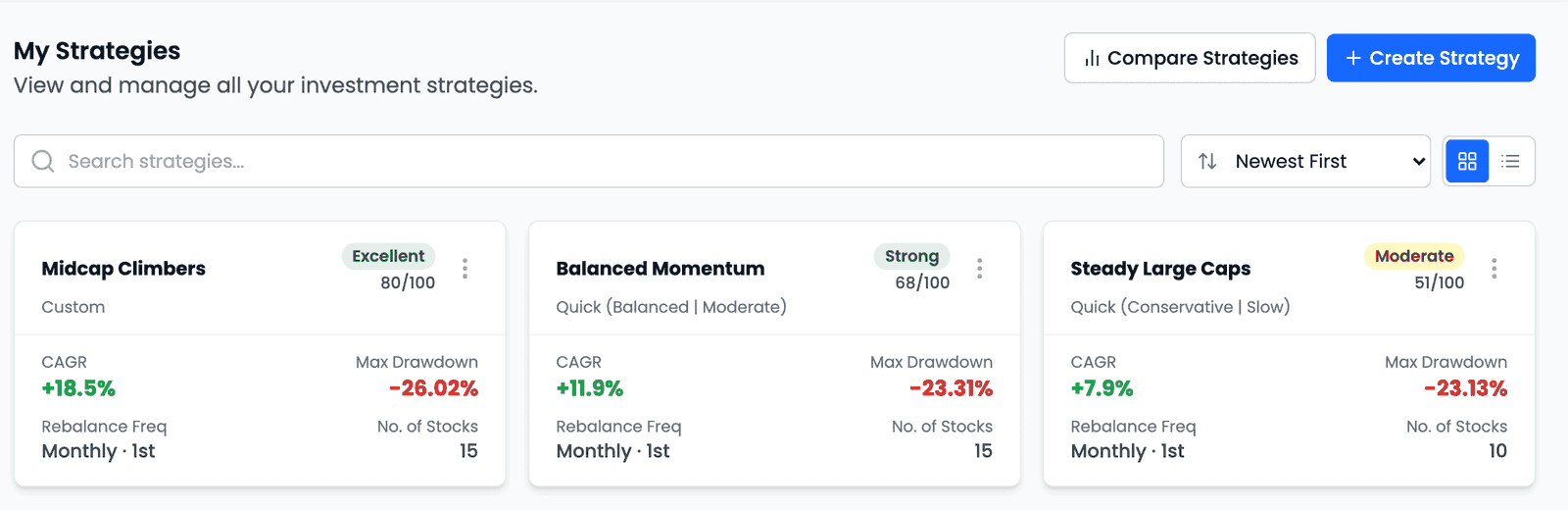
From there a strategy can be customized and tested again, copied with Save As, compared against others, or taken forward into a simulation. That last step is deliberate rather than automatic — a backtest does not become a simulation on its own, and the gap between them is where you decide whether the evidence was actually good enough.
The honest framing for a first strategy: you are not trying to find a good one yet. You are trying to state one clearly enough that a backtest can tell you something useful about it.
Key takeaways
- The builder converts an investment idea into explicit, repeatable rules — a specification, not a trade.
- Every strategy runs the same five stages in the same order: universe, eligibility, ranking, selection and allocation, rebalance.
- Each stage narrows what the next one sees, which is why a stock excluded by the universe can never be ranked, however well it is doing.
- Quick Strategy and Custom Strategy are the same engine — Quick sets most dials for you from a defined mapping, Custom hands them over.
- Customize opens a quick strategy in the Custom Strategy Builder with its presets populated, so starting quick does not lock anything in.
- Risk Level decides the opportunity set; Strategy Speed decides the signal. They meet at only one setting, Exit Rank.
- The strategy scope is technical and price-based — there are no fundamental filters, and nothing in the builder places an order.
- No setting is the cautious one. Each names an upside and a cost together, and the honest way to read them is as trade-offs.