
Using the Quick Strategy Builder
The Quick Strategy asks three questions and sets about a dozen things from your answers. This is what each of the three dials actually moves underneath — and why Strategy Speed is not a second risk setting.
What You’ll Learn
By the end of this article, you’ll understand:
- What each of the three dials actually sets underneath
- Why Strategy Speed is not a second risk setting
- How Risk Level decides the opportunity set and Speed decides the signal
- What a full quick strategy looks like once the presets are applied
- What changes, and what does not, when you move one dial
- Why a quick strategy is a starting point rather than a recommendation
What you'll have at the end
A strategy, and a backtest of it, in about a minute. This is the whole screen:
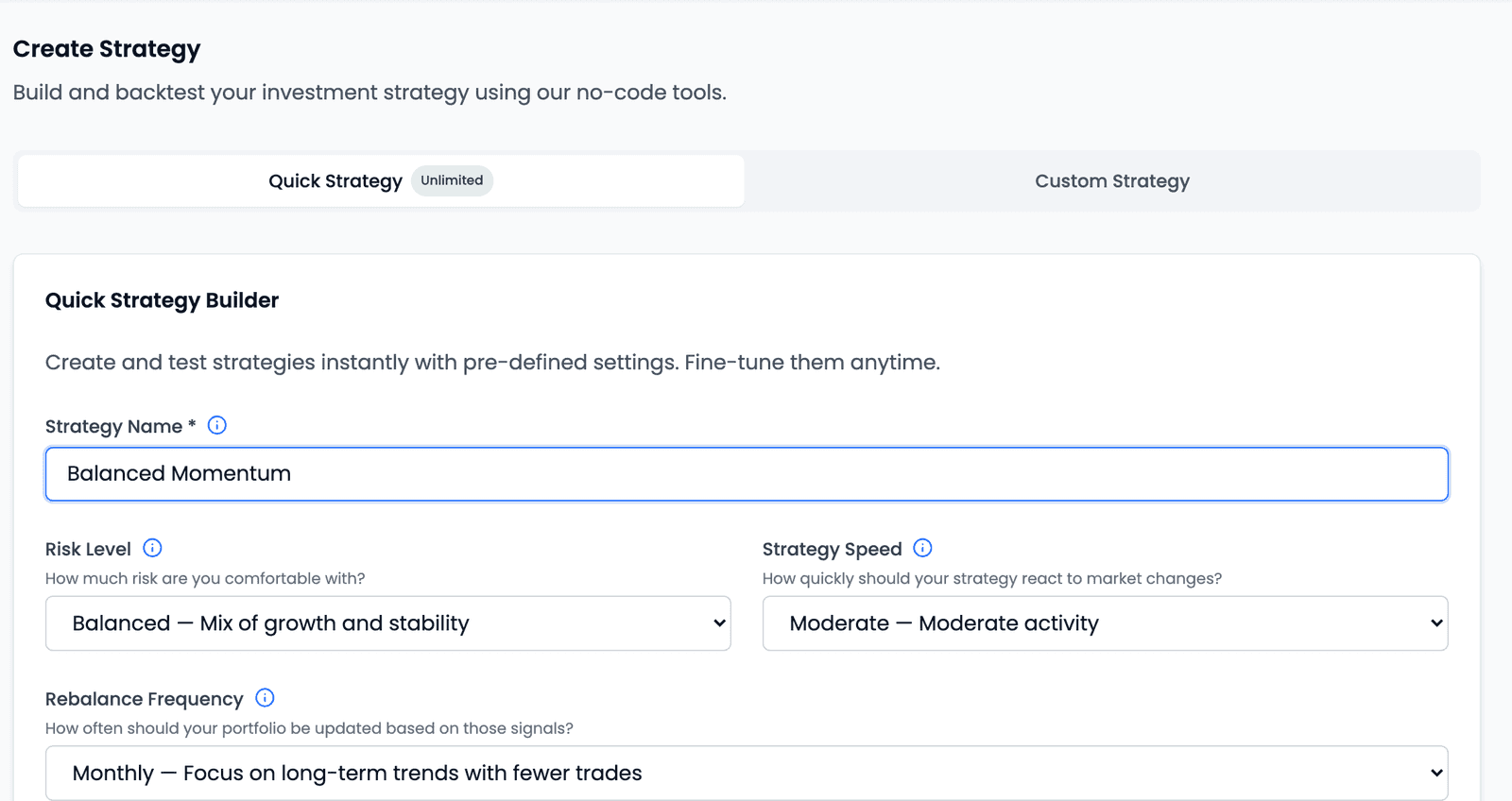
More usefully, you will know what your three answers actually set. The Quick Strategy asks three questions and configures roughly a dozen things from them. Answering by instinct works — it is designed to — but it means inheriting a dozen decisions you never saw. This article is about seeing them.
Before you open it
Three things are worth settling first, on paper, because the builder will not ask them in these words.
How wide a pool you want to draw from. Every large listed company, or everything down to smaller ones. This is the single biggest determinant of what your strategy can ever hold.
How much of a fall you can sit through without abandoning the rules. Not what you would like to earn — what you could tolerate on the way.
How often you want to look at it. Weekly attention and monthly attention produce genuinely different strategies, and the more frequent one is not the more serious one.
If those feel unfamiliar, they are the same decisions covered in more depth for any builder — the Quick Strategy is simply a shorter route through them.
What each dial actually sets
Here is the part that is not obvious from the screen. The three dropdowns do not each control "a bit of everything". They divide the work almost cleanly:
| Dial | What it decides | Settings it drives |
|---|---|---|
| Risk Level | The opportunity set — what the strategy may hold, and how many | Universe · Market Cap · Liquidity · Number of Stocks |
| Strategy Speed | The signal — how the strategy decides what looks good | Moving Averages · ROC Filters · Ranking Method · Super Trend Filter · 52 Week High Filter |
| Both together | When a holding is let go for slipping down the rankings, rather than for falling in price | Exit Rank |
Exit Rank is worth a moment, because it is the one exit rule a quick strategy sets for you. A strategy holding 15 stocks with an Exit Rank of 30 does not sell a holding the moment it drops out of the top 15 — it tolerates the drift and lets go only once the stock has fallen past 30th. The gap between the two numbers is how much slack the strategy allows before acting.
One further thing is easy to miss: Rebalance Frequency is not part of this mapping at all. It is applied as you choose it, and the only thing it brings with it is the day: weekly and fortnightly strategies rebalance on a Monday, monthly ones on the 1st.
Risk Level
"How much risk are you comfortable with?" — three options, each naming a cost alongside its upside.

What it actually moves is how wide a net you cast:
| Universe | Market Cap | Liquidity | Penny / T2T | Number of Stocks | |
|---|---|---|---|---|---|
Conservative | Nifty 50 | ₹10,000 crore+ | ₹2 crore+ | Excluded | 10 |
Balanced | Nifty 200 | ₹5,000 crore+ | ₹1 crore+ | Excluded | 15 |
Aggressive | Nifty 500 | ₹1,000 crore+ | ₹50 lakh+ | Excluded | 20 |
Read across a row and the logic is consistent: as you move down, the pool widens, the size and tradability floors drop, and the money spreads across more positions.
One column does not move at all: penny and T2T stocks are excluded at every
Risk Level, Aggressive included. Those are shares under ₹10, and securities in
the exchange's Trade-to-Trade segment, which must be settled by delivery and cannot
be sold the same day they are bought. Aggressive widens the pool by reaching
further down the Nifty 500 and lowering the floors — not by admitting those two
categories. If you want either in a strategy, you have to tick it yourself in the
Custom Strategy Builder.
Strategy Speed
"How quickly should your strategy react to market changes?"
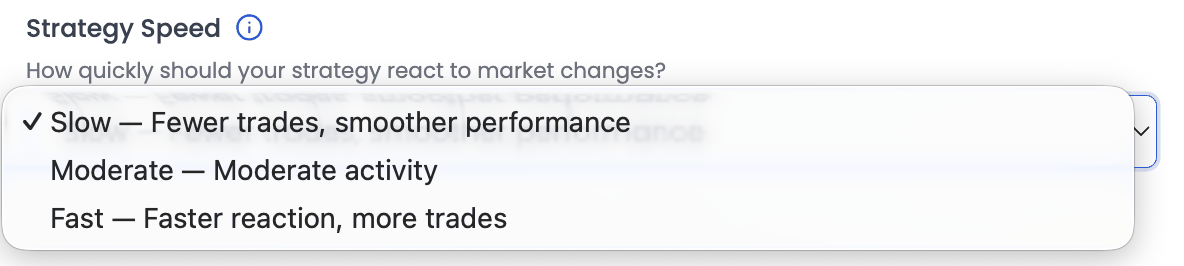
Speed is expressed almost entirely as time horizon. A slow strategy looks at long measurement windows; a fast one looks at short ones.
| Moving Averages | ROC Filters | Ranking Method | Super Trend Filter | 52 Week High Filter | |
|---|---|---|---|---|---|
Slow | 200-day SMA | 9- and 12-month | Volatility Adjusted Returns | Slow (Stronger Confirmation) | within 25% |
Moderate | 100- and 200-day SMA | 6-, 9- and 12-month | Volatility Adjusted Returns | Balanced | within 20% |
Fast | 50-, 100- and 200-day SMA | 3-, 6- and 9-month* | Absolute Returns | Fast (More Reactive) | within 20% |
* One exception, and it is deliberate: at Aggressive + Fast the ROC Filters
are 3- and 6-month only. The most reactive combination available drops the longest
of its three windows, so it is the one place Risk Level nudges a setting that
otherwise belongs entirely to Speed.
One change here is larger than it looks. The Ranking Method flips at Fast.
Slow and Moderate both rank on Volatility Adjusted Returns — return weighed
against how much the stock moved to produce it. Fast switches to Absolute Returns,
which stops discounting for volatility altogether. That changes what the strategy
considers best, and it happens inside a control you never touched.
Fast is not a synonym for riskier
These are two different questions, and the mapping proves it. Look at what
Strategy Speed moves: indicators, ranking, confirmation. Look at what it does
not move: the universe, the market-cap floor, the liquidity floor, the number of
holdings. Not one of those changes when you go from Slow to Fast.
A fast strategy trades more often and reacts to shorter-term moves. A risky one holds smaller, thinner companies in fewer positions. You can have either without the other.
Rebalance Frequency
"How often should your portfolio be updated based on those signals?" — four options, and the only dial outside the preset mapping.

Daily, Weekly, Fortnightly and Monthly do what they say (weekly and
fortnightly on a Monday, monthly on the 1st). What they really
decide is how long a decision stays wrong before the rules get a chance to fix
it — and equally, how long a good position is left alone.
More frequent is not more attentive. A daily strategy acts on information a monthly one deliberately ignores, and some of that information is noise.
One strategy, and what one dial changes
Take Balanced · Slow · Monthly — one notch slower than the configuration in
the screenshot at the top of this article. Here is everything the two dials set, beside the same
strategy with only Strategy Speed moved to Fast.
| Setting | Balanced · Slow | Balanced · Fast |
|---|---|---|
| Universe | Nifty 200 | Nifty 200 |
| Market Cap | ₹5,000 crore+ | ₹5,000 crore+ |
| Liquidity | ₹1 crore+ | ₹1 crore+ |
| Penny Stocks | Excluded | Excluded |
| T2T Stocks | Excluded | Excluded |
| Number of Stocks | 15 | 15 |
| Moving Averages | 200-day SMA | 50-, 100- and 200-day SMA |
| ROC Filters | 9- and 12-month | 3-, 6- and 9-month |
| Ranking Method | Volatility Adjusted Returns | Absolute Returns |
| Super Trend Filter | Slow (Stronger Confirmation) | Fast (More Reactive) |
| 52 Week High Filter | within 25% | within 20% |
| Exit Rank | 30 | 20 |
Six settings move. Six do not — and the six that stay put are precisely the ones that determine what the strategy can own and how concentrated it is.
That is the whole argument for keeping the two dials separate in your head. Moving Speed changed how the strategy reads the market. It did not change what the strategy is allowed to buy.
Review and run
The button reads Review & Run Backtest, which tells you where the Quick Strategy points. It opens a Strategy Review dialog listing every setting your three answers produced — the table above, for your choices — with Go Back and Run Backtest. Run Backtest creates the strategy and starts its backtest in one step; there is no separate save-then-test step.
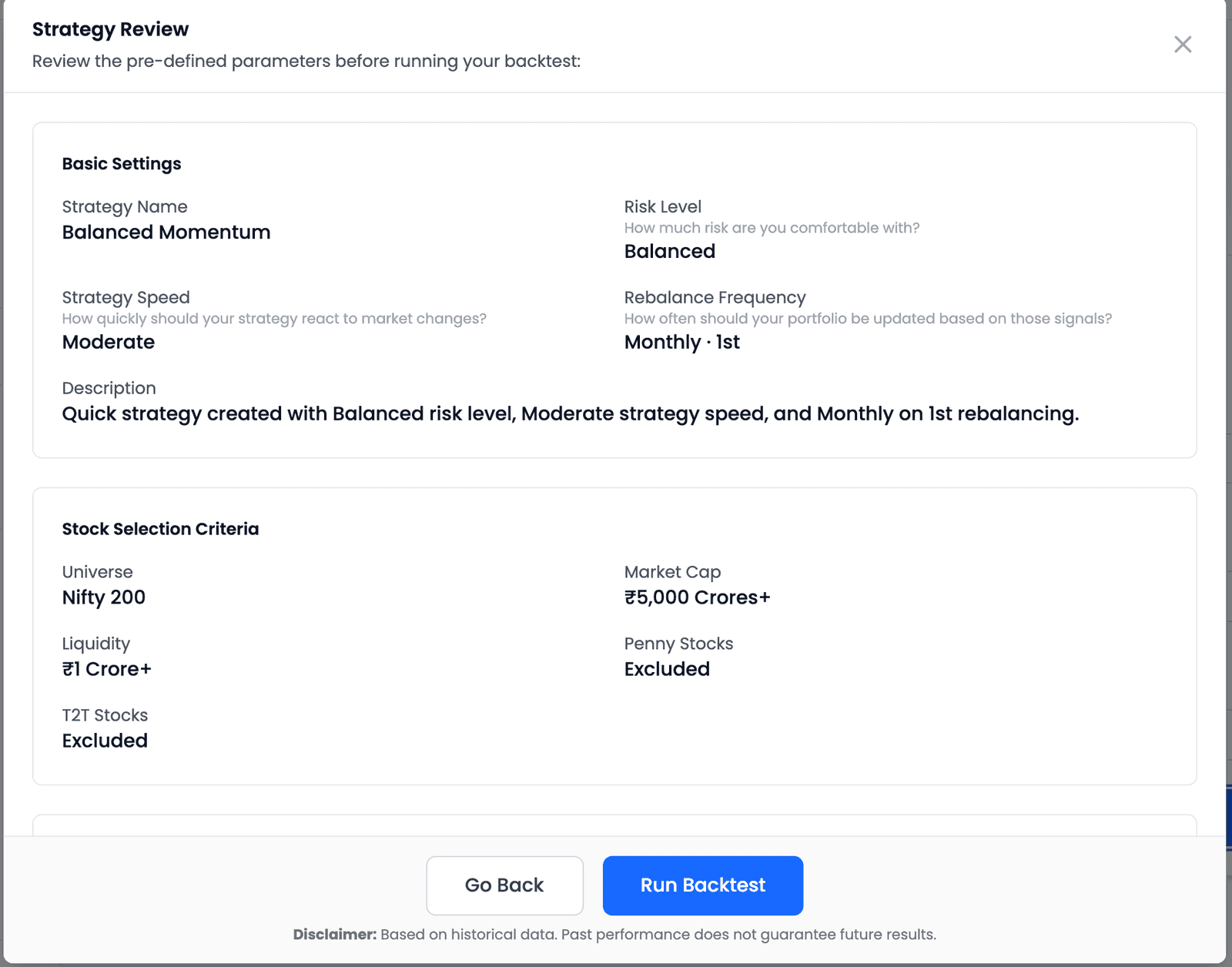
A Quick Strategy spends no Strategy credits — that is what the Unlimited badge on its tab means. Its backtest runs from 1 January 2021 (or the start of your plan's data window) to the latest close, on ₹5,00,000 and with no transaction cost assumed.
From three answers to evidence
- Name it and set three dialsStrategy Name is required; the three dropdowns each carry a default
- Presets fill in the restThe dozen settings above, derived from your Risk Level and Strategy Speed
- Review & Run BacktestRead every preset in the Strategy Review dialog, then run
The results page then carries the strategy's own description back to you — for example, "Quick strategy created with Balanced risk level, Moderate strategy speed, and Monthly on 1st rebalancing." Worth reading, because it is the product restating what you chose.
A starting point, not a recommendation
Two things to be clear about before you read any result.
The presets are defaults, not advice. Someone chose sensible values for each combination. They are not tailored to your circumstances, and no combination is put forward as the right one — every option label names a trade-off rather than a benefit.
Nothing here is locked in. From the results page, Customize opens the
same strategy in the Custom Strategy Builder with every preset already populated
and editable. So a quick strategy is not a simplified alternative you must
eventually abandon — it is the same strategy object entered through a shorter door.
One difference to know: re-running a customized strategy is a Custom backtest, so
it spends one Strategy credit, and the app asks you to confirm first.
That makes the Quick Strategy a reasonable starting point even if you fully intend to configure things yourself. It hands you a working configuration to react to, rather than an empty form to fill, and reacting to something concrete is usually easier than specifying from nothing.
What a single backtest of it can tell you, and what it cannot, is a separate question — and the more important one.
Key takeaways
- The Quick Strategy asks three questions and sets about a dozen settings from your answers — the value is in knowing which.
- Risk Level decides the opportunity set: universe, market-cap and liquidity floors, and the number of holdings.
- Strategy Speed decides the signal: moving averages, ROC windows, ranking method, Super Trend Filter and the 52 Week High Filter.
- Exit Rank is the only setting both dials influence — it decides when a holding is let go for slipping down the rankings rather than for falling in price.
- Speed is expressed as time horizon — Slow reads long windows, Fast reads short ones — and the Ranking Method flips to Absolute Returns at Fast.
- Fast is not a synonym for riskier: moving Speed changes nothing about the universe, the size and liquidity floors, or the number of holdings.
- Penny and T2T stocks are excluded at every Risk Level, Aggressive included — to admit them you have to tick them yourself in the Custom Strategy Builder.
- Rebalance Frequency sits outside the preset mapping; it decides how long a decision stays wrong before the rules can revisit it.
- A quick strategy is a starting point, not a recommendation — Customize opens it in the Custom Strategy Builder with every preset editable, and spends one Strategy credit on the re-run.