Managing Your Subscription & Payments
How buying a plan works, from checkout to the bank or UPI approval, and how to manage it afterwards: upgrading, changing to a lower plan, auto-renew, receipts and refunds.
What You’ll Learn
By the end of this article, you’ll understand:
- What happens at checkout, including the bank or UPI approval
- How upgrading and changing to a lower plan work
- What auto-renew means, and what to do when a renewal fails
- Where to find receipts, and the refund policy
Subscribing to a plan
You choose a plan on the Pricing page, which is also where the current prices and what each plan includes are always listed. This guide deliberately quotes no figures: plans can change, and Pricing is the place that stays up to date.
Payments are handled by Cashfree, a payment gateway, and you can pay by card or UPI. A plan is paid under a mandate, a standing permission that you approve in your bank or UPI app, so buying one always ends with an approval step outside NiveshBuddy.
From Pricing to an active plan
- Choose a planOn the Pricing page, monthly or yearly
- Check the checkoutThe plan, any coupon discount and Due today
- Press SubscribeThe Cashfree payment window opens
- Approve in your bank or UPI appKeep the NiveshBuddy page open while you do
What the checkout shows
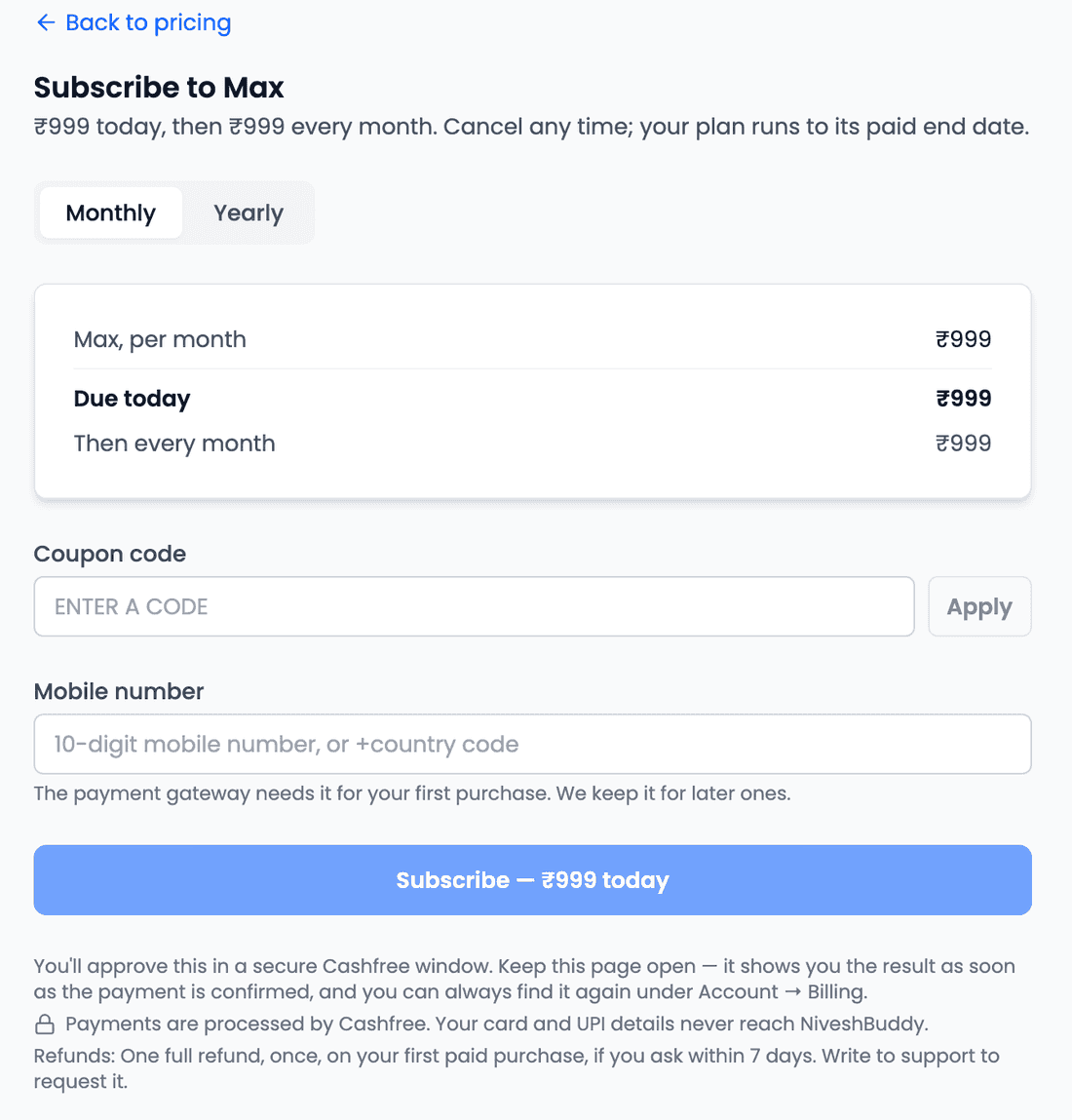
The checkout lists the plan, any coupon discount and the amount Due today. Above those lines, a one-sentence summary says what will happen, in the form "₹X today, then ₹Y every month. Cancel any time; your plan runs to its paid end date." (or every year, for a yearly plan). Read that sentence before you pay: it is the whole arrangement in one line.
Why a mobile number is asked for
On your first purchase only, the checkout asks for a Mobile number. The payment gateway needs it, and NiveshBuddy keeps it so later purchases don't ask again. It is the only phone number the product asks for. Signing in to NiveshBuddy is still with Google; the number has nothing to do with your login.
Coupons and offers
Eligible coupons available at the time of purchase will be visible to you at checkout. Coupons may apply to a first purchase or to a later upgrade, depending on each coupon's eligibility. If one is shown, or you have a coupon code, you can apply it there. Offers are not always available, so don't count on one being shown.
Approving the payment
Pressing Subscribe — ₹X today opens Cashfree. On a computer it opens in a popup window. On a phone or tablet, in the installed NiveshBuddy app, or when your browser blocks the popup, it opens in the same tab instead.
From there you approve the payment in your bank or UPI app. While you do, NiveshBuddy shows "Keep this page open — it updates on its own as soon as your bank confirms it." There is nothing to refresh.
Your card and UPI details never reach NiveshBuddy.
After you pay
When the approval is done, you land on a payment status page. It shows one of these:
| Status | What it means |
|---|---|
| Payment received | The payment is confirmed and your plan is active. The receipt is shown on the page |
| Payment received and refunded — your plan didn't change | Money was taken and returned, and your plan stayed as it was |
| Confirming your payment | Still checking with the bank. You can leave this page; it keeps checking |
| We haven't received confirmation yet | No confirmation of the payment has come through so far |
| Payment not completed yet | The payment didn't finish. Use Try again to go back through checkout |
| This checkout closed without a payment | The checkout ended without paying. If money left your account, it will be confirmed within 3 days and we'll email you |
| Payment not found | The page can't find the payment it was opened for |
The email you receive when a payment is received links back to the same status page.
Upgrading
An upgrade takes effect immediately. You don't wait for your current plan to run out: the new plan starts as soon as the first payment is confirmed.
You don't pay twice for the same time, either. The checkout shows a line for the Unused value of your current plan, the value of the time you have left, and deducts it from what's due today. Going from Monthly to Yearly on the same plan counts as an upgrade and works the same way.
If a coupon is eligible for your upgrade, the checkout shows it, just as it does for a first purchase.
Changing to a lower plan
Moving to a lower plan works the other way round: nothing happens today. In Billing, under "Change to a lower plan at your next renewal", press Set. Nothing is charged now. You keep your current plan until its paid end date, and the lower plan starts from the next renewal. If you change your mind before then, press Withdraw to cancel the change.
There is one case this doesn't cover. Going from Yearly to Monthly isn't offered as a change. Instead, turn auto-renew off, and once your year ends, subscribe to the monthly plan from Pricing.
Auto-renew
A plan you buy has auto-renew on by default. You can turn it off any time before the next renewal, and the plan then runs until its paid end date. Billing shows which state auto-renew is in:
| State | What it means |
|---|---|
| On | The plan renews automatically at the end of each period |
| Off | It won't renew. You keep the plan until its paid end date |
| Waiting for approval | Your bank or UPI app hasn't confirmed the mandate yet. Nothing has been charged |
| Renewal failed | The renewal charge didn't go through. You keep the plan through a grace period, and can press Retry the charge, up to three retries for each renewal |
| Paused at your bank | The mandate is paused in your bank or UPI app. Resume it there |
If a renewal fails, you're also emailed, and the email opens Billing, where Retry the charge sits.
Don't turn auto-renew off while a renewal has failed
Normally, turning auto-renew off lets the plan run to its paid end date. Renewal failed is the exception: turning auto-renew off in that state ends the grace period, and your plan ends immediately.
Receipts and refunds
Billing History lists your paid payments. Expand any one to see its receipt, and use Print receipt to print it. If a payment is still being processed in the browser you're using, it shows at the top as Payment in progress.
The refund policy is simple: one full refund, once, on your first paid purchase, if you ask within 7 days. Write to support to request it. There is no refund button in the app, so a refund always starts with a message to support.
When a plan ends
When a plan runs out, Billing shows it with an Ended chip, and the Dashboard shows a banner: "Your plan has ended. Your strategies and simulations are all still here. Choose a plan to create, edit or run them again."
As the banner says, nothing you built is deleted. To carry on creating, editing or running them, choose a plan again from Pricing.
Common questions
Why do you need my mobile number?
The payment gateway needs it for your first purchase, and it is kept so later purchases don't ask again. It isn't used for signing in, which stays with Google.
Why did a payment window open?
Pressing Subscribe opens Cashfree, the payment gateway, so you can approve the payment and the auto-renew mandate. On a computer it opens as a popup; on a phone, in the app, or if popups are blocked, it opens in the same tab.
Can I use a coupon on an upgrade?
Possibly. Eligible coupons available at the time of purchase are shown at checkout, and a coupon may apply to a first purchase or to an upgrade depending on its eligibility.
I closed checkout — was I charged?
The status page shows This checkout closed without a payment. If money did leave your account, it will be confirmed within 3 days and you'll be emailed.
How do I get a refund?
Write to support. You can have one full refund, once, on your first paid purchase, if you ask within 7 days. There is no self-service refund in the app.
Key takeaways
- Prices and plan allowances are on the Pricing page; check the checkout summary before you pay.
- Payments go through Cashfree and are approved in your bank or UPI app. Keep the NiveshBuddy page open until it confirms.
- A mobile number is asked for on your first purchase only, for the payment gateway. Sign-in stays with Google.
- Eligible coupons available at the time of purchase are shown at checkout; whether one applies to a first purchase or an upgrade depends on the coupon.
- An upgrade starts immediately with your unused time deducted; a lower plan starts at your next renewal, and nothing is charged now.
- Auto-renew is on by default. Turn it off before the next renewal and the plan runs to its paid end date, unless a renewal has failed, when it ends immediately.
- Receipts are in Billing History. A refund is one full refund on your first paid purchase within 7 days, requested from support.