
Plans & Credits Explained
NiveshBuddy uses two kinds of credit: Strategy credits for Custom backtests and Simulation credits for each trading day a simulation runs. What spends each one, what's free, when they refill, what happens at zero, and how your plan's data window shapes a backtest.
What You’ll Learn
By the end of this article, you’ll understand:
- What spends a Strategy credit, and what's free
- How Simulation credits are used
- When credits refill, and what happens at zero
- Where to see your balance
- How your plan's data window shapes backtests
Two kinds of credit
Your plan gives you a monthly allowance of two different credits. They pay for different things, they run out in different ways, and it helps to keep them apart from the start.
A Strategy credit pays for a backtest of a Custom strategy. A backtest applies a strategy's rules to historical data to show how they would have behaved. One credit is spent each time you start a backtest for a Custom strategy. That covers the first run, every re-run after a change, and a strategy taken from an Experiment. Building a Quick Strategy does not use one.
A Simulation credit pays for a simulation, a paper portfolio run with virtual money. A simulation follows your strategy forward through the live market, one trading day at a time, and it spends one credit for each trading day it executes. A backtest looks back at the past; a simulation moves forward from today. Each draws on its own balance, and spending one kind of credit never touches the other.
How many of each you get is set by your plan. The current figures are on the Pricing page. They can change, so this guide explains the rules and leaves the numbers to Pricing.
What spends a Strategy credit
The rule is short: one Strategy credit for every backtest you start for a Custom strategy. Here is how that plays out across the app.
| Action | Strategy credit? |
|---|---|
| Run Backtest from the Custom Strategy Builder | Spends one |
| A Customize re-run (Update & Run Backtest), including of a quick strategy | Spends one |
| Use This Strategy from an Experiment | Spends one |
| Creating a Quick Strategy (its tab says Unlimited) | Free |
| Save As (copying a strategy) | Free |
The middle row trips people up most. A Quick Strategy is free to build, but once you Customize it and re-run it, it is backtested as a Custom strategy and spends a credit like any other.
You are told before a credit goes. The app asks you to confirm with "This will spend 1 Strategy credit. You have X of Y left this month." On plans with a monthly cap, the Review step of the Custom Strategy Builder also shows how many you have left: "N Strategy credits left this month." Nothing is spent until you confirm.
How Simulation credits are used
A Simulation credit is spent for each trading day a running simulation executes. You don't spend it by hand. It is charged by the nightly run, so a simulation that isn't running doesn't draw on your balance.
What a month of simulation uses depends on how many simulations you keep running and for how many trading days. Two simulations running side by side draw about twice as fast as one.
Refills, and running out
Both kinds of credit refill monthly, on a date the app shows you. That date follows your own credit month, so look for it next to your balance rather than assuming a fixed day. Unused credits don't carry over: whatever is left when the month ends is gone, and the new month starts from your plan's allowance.
Running out works differently for each kind.
Strategy credits at zero
Run Backtest still looks clickable, but the run is refused. A message, No Strategy credits left, says you've used all your Strategy credits this month, shows the date they refill, and offers Upgrade. Quick Strategies and Save As still work, because they never spent a credit.
Simulation credits at zero
Create Simulation, Start Simulation and Resume are disabled, and hovering over them shows: You're out of Simulation credits. They refill on, followed by the date. A banner also warns that running simulations will pause.
Paused simulations don't restart on their own
When Simulation credits run out, running simulations pause at the next nightly run, and they don't resume on their own. A paused simulation says why: "Paused — out of Simulation credits. It won't resume on its own…" Once credits refill, or after an upgrade, open each one and resume it by hand. Its portfolio is kept while it is paused. Any rebalance it missed is skipped, not replayed, and it picks up at the next scheduled rebalance day.
Two other messages can look like a credit problem, but they aren't. "Daily limit reached" (it resets at midnight IST) and "Too many requests" are temporary limits. They have nothing to do with your plan, which is why neither shows an Upgrade button. A brief rate limit is retried once for you automatically. Otherwise, wait and try again.
Where to see your balance
Your balance is always on screen, in a form that suits the device.
- On a computer, a strip in the header shows Strategy credits and Simulation credits, each in the form "{used} of {limit} used · {remaining} left · refills {date}". A credit your plan doesn't cap shows Unlimited, and one it doesn't include shows Not on your plan. Beside them sits Historical Data, covered in the next section.
- On a phone or tablet, the same balances are shortened to chips, in the form "Strategy {N} left · Simulation {N} left".
- In Account → Billing → Current Plan, the same rows appear with a reminder of the rules: a Strategy credit for every backtest you start for a Custom strategy, a Simulation credit for each trading day a running simulation executes, and no carry-over.

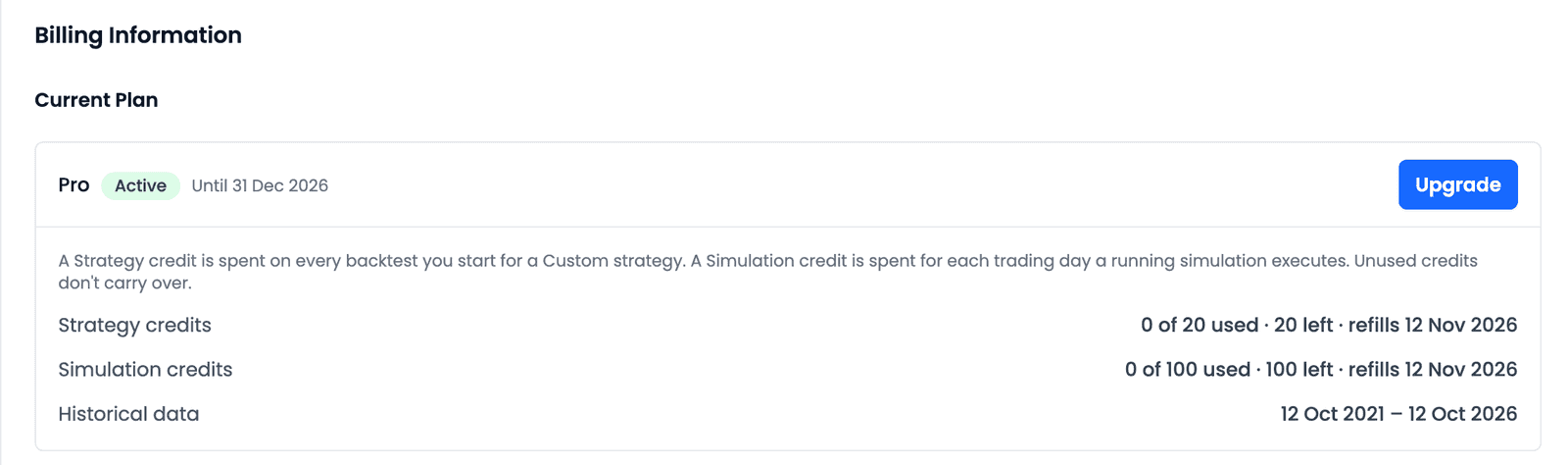
The figures in these images belong to one account on one plan on one day. Yours will match your own plan, as listed on Pricing.
Checking the refill date before a large round of re-runs can help you decide what to run now and what can wait until the new month.
Your plan's data window
NiveshBuddy uses historical data since 2021, adjusted for corporate actions, with end-of-day prices. Within that, each plan sets a historical data window: how far back a Custom backtest can reach.
You'll see the window in two places:
- Historical Data in the header strip shows it as a date range, or as Full history if your plan reaches all the way back.
- Backtest Period, in the Custom Strategy Builder, follows it. The presets Last 1 year and Last 5 years only appear if your window is long enough to hold them. Custom is always available, so you can choose your own dates inside the window. The default is the longest preset that fits.
This matters when you read results. A backtest over a shorter window covers fewer market conditions. It may miss a sharp fall or a long sideways stretch that a longer period would include. That doesn't make a short backtest wrong. It describes how the rules behaved over the dates tested, and past results, short or long, do not guarantee future performance.
What your plan includes
The Pricing page has the current plans, prices and allowances side by side, and it is the place to compare them. The Quick Strategy is available on every plan.
Some features depend on your plan, including Experiments and AI Connectors. Check Pricing for which plans include them before you plan around either.
If your plan ends, Billing shows an Ended chip with Choose a plan, and the Dashboard carries a banner: "Your plan has ended. Your strategies and simulations are all still here. Choose a plan to create, edit or run them again." Your work is not deleted. Choosing a plan lets you pick it up again.
Common questions
Does a Quick Strategy use credits?
No. Building and backtesting a Quick Strategy is free, which is why its tab says Unlimited. If you later Customize it and re-run it, that re-run is a Custom backtest and spends one Strategy credit.
Do unused credits carry over?
No. Credits refill monthly on the date the app shows, and anything unused at the end of the month is not added to the next one.
Why did my simulation pause?
Most likely your Simulation credits ran out. Running simulations pause at the next nightly run and don't resume on their own. Once credits refill or you upgrade, open the simulation and resume it by hand.
Does Save As use a credit?
No. Save As copies a strategy for free. A credit is only spent when you start a backtest for a Custom strategy, so running the copy after you Customize it will spend one.
Key takeaways
- A Strategy credit is spent on every backtest you start for a Custom strategy: a first Run Backtest, a Customize re-run, or Use This Strategy from an Experiment.
- Quick Strategies and Save As are free.
- A Simulation credit is spent for each trading day a running simulation executes, charged by the nightly run.
- Credits refill monthly on the date the app shows, and unused credits don't carry over.
- At zero Simulation credits, running simulations pause at the next nightly run and must be resumed by hand.
- Your balance is in the header on a computer, in chips on a phone, and under Account → Billing → Current Plan.
- Your plan's historical data window decides how far back a Custom backtest can reach; the Pricing page has the current figures.