
Portfolio Settings and Exits in the Custom Builder
Step 3 of the Custom Strategy Builder, setting by setting: why Exit Rank is set wider than your holdings, why Exit Delay is counted in periods rather than days, how Investment Mode sizes a new position, and which settings can exit a stock you already hold.
What You’ll Learn
By the end of this article, you’ll understand:
- How Number of Stocks sets how concentrated the portfolio is
- Why Exit Rank is normally set wider than the number of holdings
- Why Exit Delay is counted in periods rather than days
- How Investment Mode sizes a new position against the target allocation
- Which settings only decide entries, and which can also exit a stock you hold
What this step decides
Steps 1 and 2 of the Custom Strategy Builder decide what the strategy may hold and how it ranks it. Ranking produces an order; Step 3 — Portfolio Settings decides how far down it to go, how often to look again, and what makes a holding leave.
The example used throughout is the builder article's running idea: mid-sized companies rising steadily, held about fifteen at a time, tolerant of a bit of drift.
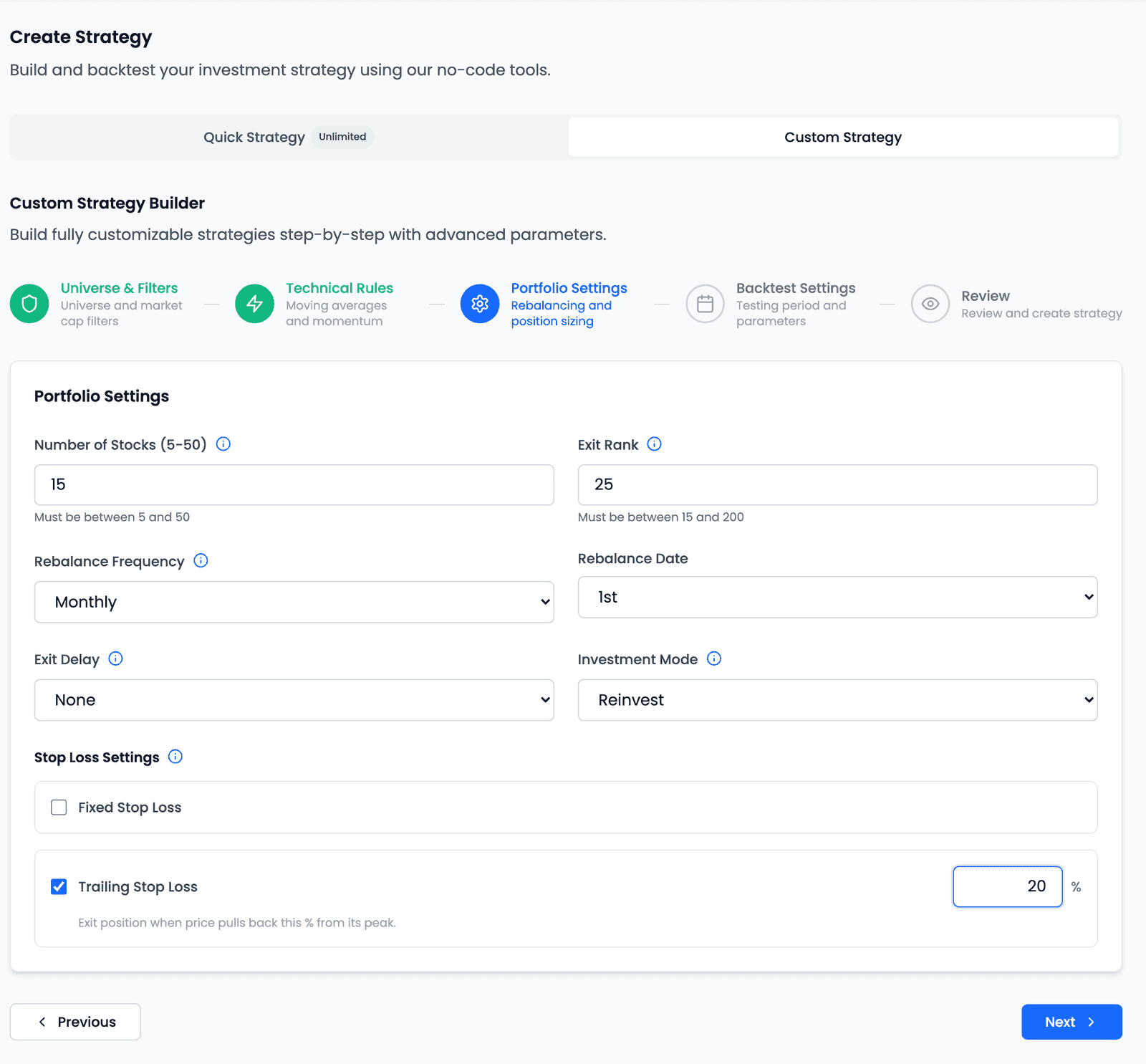
Four settings carry a one-line hint naming the trade-off of raising them: Number of Stocks, Exit Rank, Rebalance Frequency and Stop Loss Settings. The sections below explain each at more length.
| Control | Options or range | Notes |
|---|---|---|
| Number of Stocks | 5–50 | The product's stated range |
| Exit Rank | Number of Stocks to 200 | Normally set wider than Number of Stocks |
| Rebalance Frequency | Daily · Weekly · Fortnightly · Monthly | Weekly/Fortnightly add a Rebalance Day; Monthly a Rebalance Date |
| Exit Delay | None · 1, 2 or 3 periods | Periods, not days |
| Investment Mode | Reinvest (no capping) · Reinvest (capped at 1.5×) · Reinvest (capped at 2×) · Fixed | How much cash goes into each new position |
| Stop Loss Settings | Two independent checkboxes | Both off unless you turn them on |
How each setting works
Number of Stocks
Number of Stocks is the most stocks the strategy holds at once, from 5 to 50, and sets how concentrated the portfolio is. Fewer: each stock moves the result more, for better and worse. More: each matters less, and every rebalance has more trades. No number is best; fewer stocks can look better or worse in one backtest by chance, so check more than one period.
Exit Rank
Exit Rank is how far down the ranking a held stock can fall before it is exited at the next rebalance. It runs from your Number of Stocks up to 200, and the helper text follows what you set: with 5 stocks it reads "Must be between 5 and 200", with 15 "Must be between 15 and 200". A strategy holding the top 15 with an Exit Rank of 25 tolerates a stock slipping to 16th, and lets go only once it falls past 25th.
The gap between the two is the design decision. Close together, the strategy exits on small ranking movements and trades more, staying near the current leaders. Far apart, it trades less but holds positions well past the point they stopped being among its best ideas. Tolerant of drift suggests 15 and 25.
Rebalance Frequency
Rebalance Frequency is how often the strategy re-ranks its stocks and swaps out
those that dropped out. It brings a second control: a Rebalance Day (Monday to
Friday) for Weekly and Fortnightly, a Rebalance Date (1st to 31st) for
Monthly, and nothing for Daily.
More often reacts to new leaders sooner. What you give up: more trades, so transaction costs weigh more, and in a simulation more trades to review. Two otherwise identical strategies rebalancing on different dates produce different historical results, so don't read much into a small difference between two backtests.
Exit Delay
Exit Delay is the setting most likely to be misread. Its options are None,
Delay by 1 period, Delay by 2 period and Delay by 3 period, and a period is
the strategy's own rebalance cycle, not a day. "Delay by 1 period" is a month on a
monthly strategy and a day on a daily one, and nothing on the screen tells you which.
A delay holds back an exit for that many more rebalances, giving a stock that slips below the Exit Rank, or fails a filter, a chance to recover rather than being exited and re-entered. Stop losses are never delayed. What you give up: fewer trades, but fading stocks held for longer.
Investment Mode
Investment Mode decides how much cash goes into each new position, measured against the target allocation: the portfolio's value today divided by the Number of Stocks. A ₹12 L portfolio holding 10 stocks has a target allocation of ₹1.2 L.
| Mode | Each new stock gets, at most |
|---|---|
Reinvest (no capping) | All the available cash, with no per-stock cap |
Reinvest (capped at 2×) | Twice the target allocation |
Reinvest (capped at 1.5×) | One and a half times the target allocation |
Fixed | The target allocation itself |
Say a sale frees ₹2.5 L for one new stock in that ₹12 L portfolio. Fixed invests
₹1.2 L, Reinvest (capped at 1.5×) invests ₹1.8 L, and Reinvest (no capping)
invests all ₹2.5 L. If it frees only ₹1.5 L, Fixed still invests ₹1.2 L, and both
Reinvest modes invest the full ₹1.5 L.
Three rules hold in every mode
Whatever a cap leaves over stays as cash in the portfolio. No mode adds money:
an entry is cut down to the cash on hand. And when several new stocks are entered on
the same day, the cash is split equally between them first; holdings you already own
are never topped up or trimmed. Quick Strategies use Reinvest (capped at 1.5×).
What you give up: with no capping, one large sale can make a single new position
much bigger than the rest; with a tighter cap or Fixed, positions stay closer in
size but more cash can sit idle. Test the mode that fits the strategy's idea.
Stop Loss
Stop Loss Settings has two independent checkboxes: a Fixed Stop Loss, measured from the entry price, and a Trailing Stop Loss, measured from the highest price since entry. They are checked on each day's close, and a triggered exit fills at the next close. Turning one on can limit a single position's loss between rebalances. What you give up: it can also exit a stock just before a recovery, adding trades. Test with and without it and compare the worst fall and the number of trades. Why a NiveshBuddy stop is a rule checked on a close rather than an order resting in the market is covered in its own article.
What makes a strategy exit a stock
Every setting in the builder decides what the strategy enters. Only some of them can also exit a stock you already hold, and mixing the two up is the usual reason for a question like "why do I still hold a stock that left the Top 50?"
| What the setting does | Settings | A stock you hold that fails it |
|---|---|---|
| Decides entries only | Universe · Market Cap · Liquidity · Penny Stocks · T2T Stocks | Is not exited for it. It stays until its rank falls past the Exit Rank |
| Decides entries, and judges holdings | Moving Averages · 52 Week High Filter · Super Trend Filter | Is exited at the next rebalance. The trade's reason names the filter it failed |
| Ranks | Exit Rank | Is exited at a rebalance once it ranks below the Exit Rank |
| Exits only, on any trading day | Fixed and Trailing Stop Loss · a merger or delisting | Is exited at the next close after the trigger |
So a stock that leaves the Top 50, falls under your Market Cap floor or moves into the Trade-to-Trade segment is not exited for that. It is still ranked, and stays as long as it ranks within the Exit Rank. The technical filters work differently: they are checked on every holding at each rebalance, exactly as on every candidate.
Two rules that catch people out
A missing value never exits a holding
If a stock you hold has no value for a filter on a rebalance day (a moving average it can't compute after a gap in trading, say), that filter is skipped for it, and it is judged on the filters it has values for. A candidate with a missing value isn't entered.
Timing differs by kind
Rank and filter exits happen only at a rebalance, and Exit Delay can hold them back. Stop losses, mergers and delistings are checked on every trading day, and Exit Delay never holds them back (an exit on a stock that has stopped trading still waits until trading resumes).
In the app, each setting's help panel says which kind it is, under When it applies.
Key takeaways
- Number of Stocks (5 to 50) sets how concentrated the portfolio is; no number is best, so check more than one period.
- Exit Rank is normally set wider than Number of Stocks, and the gap between them is how much ranking drift the strategy tolerates.
- Exit Delay is counted in periods — the strategy's own rebalance cycle — not in days, and stop losses are never delayed.
- Investment Mode caps each new position against the target allocation (portfolio value today ÷ Number of Stocks); leftover cash stays as cash, and no mode adds money.
- Universe, Market Cap, Liquidity, Penny and T2T only decide entries; Moving Averages, the 52 Week High Filter and the Super Trend Filter also exit a holding that fails them at a rebalance.
- A missing value never exits a holding, and only stop losses, mergers and delistings act between rebalances.