
Getting Started with Simulations
A simulation runs your strategy forward through the live market with virtual money, so you can watch it work before you decide anything with real money. What it is, how to start one, what happens in its first days, and how credits, pausing and stopping work.
What You’ll Learn
By the end of this article, you’ll understand:
- What a simulation is, and how it differs from a backtest and from a broker account
- How to start one, and what the Start Date rule means
- What happens between pressing Start and seeing the first trades
- How Simulation credits are spent
- What Pause, Resume, Stop and Delete do
What a simulation is
A Simulation is a paper portfolio run with virtual money. It takes one of your strategies and follows it forward, day by day, through the market as it actually moves. On every rebalance day it applies the strategy's rules, schedules the trades those rules call for, and records what happens to the portfolio after they run.
It sits between two things you may already know:
A backtest
Applies your rules to history you already know the outcome of. It answers how the rules would have done, all at once, in seconds.
A simulation
Applies the same rules to days that haven't happened yet, as they arrive, with virtual money. It answers how the rules behave now, a rebalance at a time.
A broker account
Where real orders and real money live. NiveshBuddy is not one: a simulation places no orders, and nothing in it reaches a broker.
That middle position is the point. A backtest can be tuned until history looks good; a simulation can't, because the future hasn't been seen yet.
When to start one
Start a simulation once you have a strategy whose backtest you have actually read: its risk as well as its return, and the Key takeaway's caveats. A simulation is the next test of that strategy, not a substitute for the first one.
It is also the way to get used to a strategy's rhythm before you act on it anywhere else: how often it trades, what its sells look like, how it feels to hold through a bad week.
Starting a simulation
There are two ways in:
- Start Simulation, on a strategy's results page or in its card menu on My Strategies. It opens a short dialog for that strategy.
- Create Simulation, on the Simulations page (or Create a Simulation on the Dashboard). It opens a larger window that first asks which of your strategies to use, then shows the same fields.
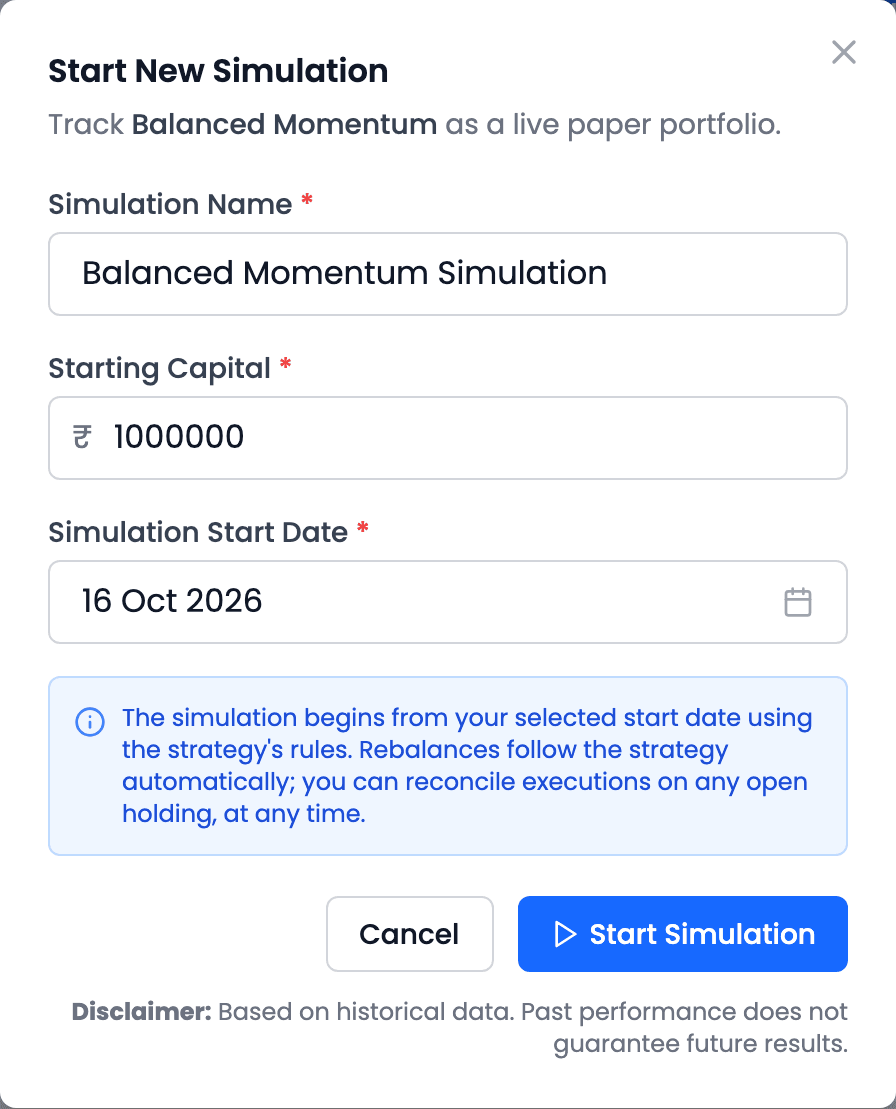
| Field | What to enter |
|---|---|
| Simulation Name | Required. It is filled in as "{strategy} Simulation"; change it if you plan to run more than one |
| Starting Capital | Required. The virtual money it starts with: any amount above zero, ₹10,00,000 by default |
| Simulation Start Date | The first trading day it runs. The earliest you can pick is today, if it is a trading day and before 15:00 IST; otherwise the next trading day. Only trading days can be chosen |
The simulation copies the strategy's settings as they are when you press Start Simulation. Changing the strategy later does not change a simulation that is already running; a simulation has its own settings from then on.
What happens next
A simulation's first days
- SubmittedIt starts on the date you chose; results appear after that day's market update
- Not started yetOpening it early shows Simulation hasn't started yet, and its values show — until the first valuation
- First batch: all buysIt starts in cash, so it buys every holding the strategy targets, at that day's close
- Later batches: only changesSells of holdings that leave the rules, and buys to replace them
After you press Start, NiveshBuddy confirms it in one line, "Simulation submitted. It starts on {date}, and results appear after that day's market update.", and takes you to the Simulations page. The new simulation is listed there with its rebalance frequency and next rebalance date. Its figures fill in once it has been valued for the first time.
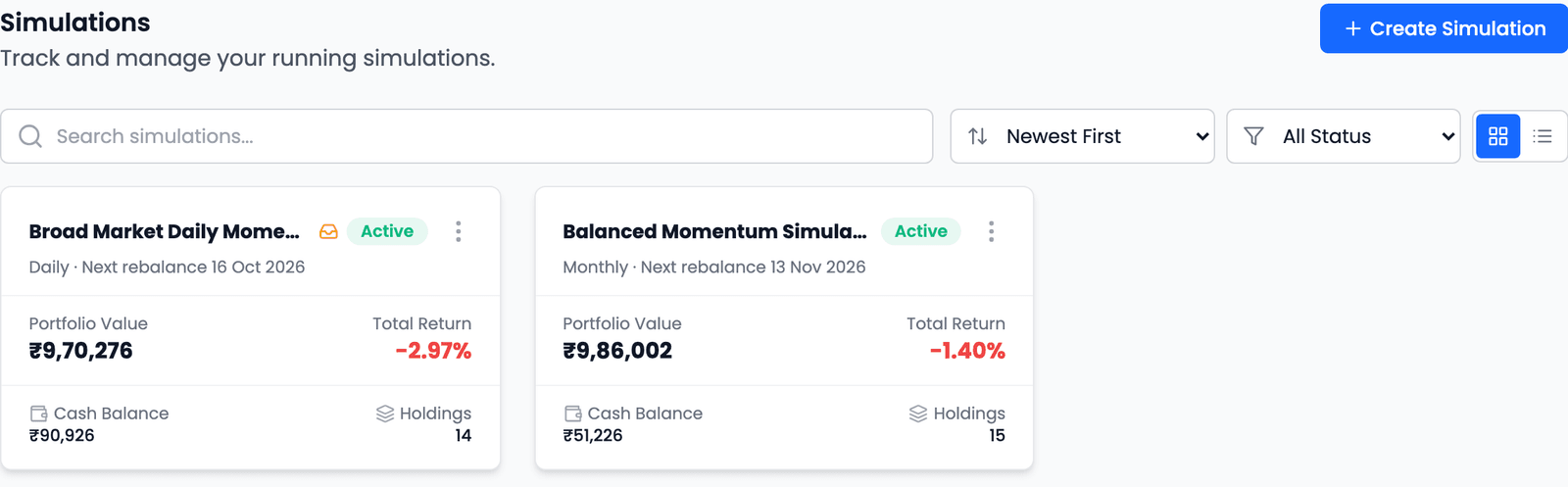
For a hypothetical demo, Balanced Momentum Simulation was submitted on 12 October, too late in the day to start that day, so its start date became the next trading day, 13 October. Its first activity reads "15 buys — fill on first trading day": one buy for every holding of a fifteen-stock strategy. What those trades are, and the one decision you can make about them, is covered in the guide to scheduled trades.
Credits, pausing and stopping
How Simulation credits are spent
A running simulation spends one Simulation credit for each trading day it runs, whether or not it trades that day. When you have none left, the start buttons are disabled, and any running simulation pauses at the next nightly run. It does not resume by itself when credits return: you resume it by hand.
| State or control | What it means |
|---|---|
| Active | Running, and rebalancing on schedule |
| Pause, then Resume | Pause holds the portfolio exactly as it is. Resume carries on with the same holdings and rebalances on the next scheduled rebalance day. Rebalances missed while paused are skipped, not made up |
| Paused for credits | Paused because Simulation credits ran out. A banner on the simulation explains it; resume it by hand once you have credits again |
| Stop | Permanent. A stopped simulation cannot be resumed, reconciled or reconfigured, and stopping does not refund credits |
| Completed | It reached its end date, and its results are final |
| Delete | Removes it completely, from the Simulations page only. It cannot be undone |
The Simulations page can filter by Active, Paused, Stopped and Completed, and sort by date, name or return. There is no way to copy a simulation: to run the same strategy again from a new date, start a new one.
Using it well
Let a simulation run for several rebalances before you judge it. Its first days are dominated by the first batch of buys and a few days of price moves, which say very little about the strategy. The two demo simulations above were both slightly down after their first three days; that is a fact about three days, not about the rules.
Change it as rarely as you can. Each time you step in, the record shows a little less of what the strategy would have done on its own.
And keep the boundary clear. A simulation tells you how your rules are behaving. Whether to act on them in your own account, and how, remains your decision.
Common questions
Does a simulation use real money or place orders?
No. It is a paper portfolio run with virtual money. It places no orders, and nothing in it reaches a broker.
Why can't I pick today as the start date?
The earliest start date is today only if today is a trading day and it is before 15:00 IST. Otherwise it is the next trading day. Weekends and market holidays can't be picked.
Does changing my strategy change its simulation?
No. A simulation copies the strategy's settings when it starts and keeps its own from then on. You can change a running simulation's rules with Edit Settings, which applies from its next rebalance.
What happens when I run out of Simulation credits?
Running simulations pause at the next nightly run, and new ones can't be started. A paused simulation doesn't restart on its own; resume it by hand once you have credits again.
Key takeaways
- A simulation is a paper portfolio run with virtual money: your strategy's rules applied to days that haven't happened yet.
- Start one from a strategy (Start Simulation) or from the Simulations page (Create Simulation); it needs a name, a Starting Capital and a start date.
- The earliest start date is today if it's a trading day before 15:00 IST, otherwise the next trading day.
- Its first batch is all buys, because it starts in cash; later batches list only what changed.
- It spends one Simulation credit per trading day; at zero it pauses at the next nightly run and must be resumed by hand.
- Pause and Resume skip missed rebalances; Stop is permanent; Delete can't be undone.