
Simulation Holdings, Trades, Cash and Settings
Four tabs on a simulation's page hold its detailed record: what it holds, every trade and the rule behind it, every rupee of cash, and the rules it runs. What each one shows, and what changes when you edit a simulation that is already running.
What You’ll Learn
By the end of this article, you’ll understand:
- What each Current Holdings column shows, and what a rank past the Exit Rank means
- How to read a Trade Log row: Status, Entry Source and Modified
- The reason behind every entry, keep and exit, on a computer and on a phone
- How the Cash Ledger ties back to the Cash Balance card
- What Edit Settings can change in a running simulation, and when the change takes effect
Overview
A simulation's page opens on six cards and the Overview and Performance tabs, which Reading Simulation Results covers. This guide picks up the other four tabs, which hold the detailed record of the virtual portfolio.
The examples come from the same hypothetical demo, Broad Market Daily Momentum Simulation, 22 days after it started on 13 Oct 2026.
When to use each tab
Active Portfolio
What the portfolio holds now, valued at the latest close, and where each holding ranks today.
Trades
The Trade Log: every round trip, its return, and the rule that caused each entry and exit.
Cash Ledger
Every movement of the simulation's cash, with a running balance.
Configuration
The rules the simulation runs, every change made to them, and Edit Settings.
Active Portfolio
Current Holdings lists what the portfolio holds. Its heading carries the date of the closing prices used, for example "Current Holdings (3 Nov)", and a count line gives the positions held against the target, here "15 of 15 positions". When slots are empty it says how many and why, for example that too few stocks passed the filters. All, Gains and Losses filter the list, each with a count.
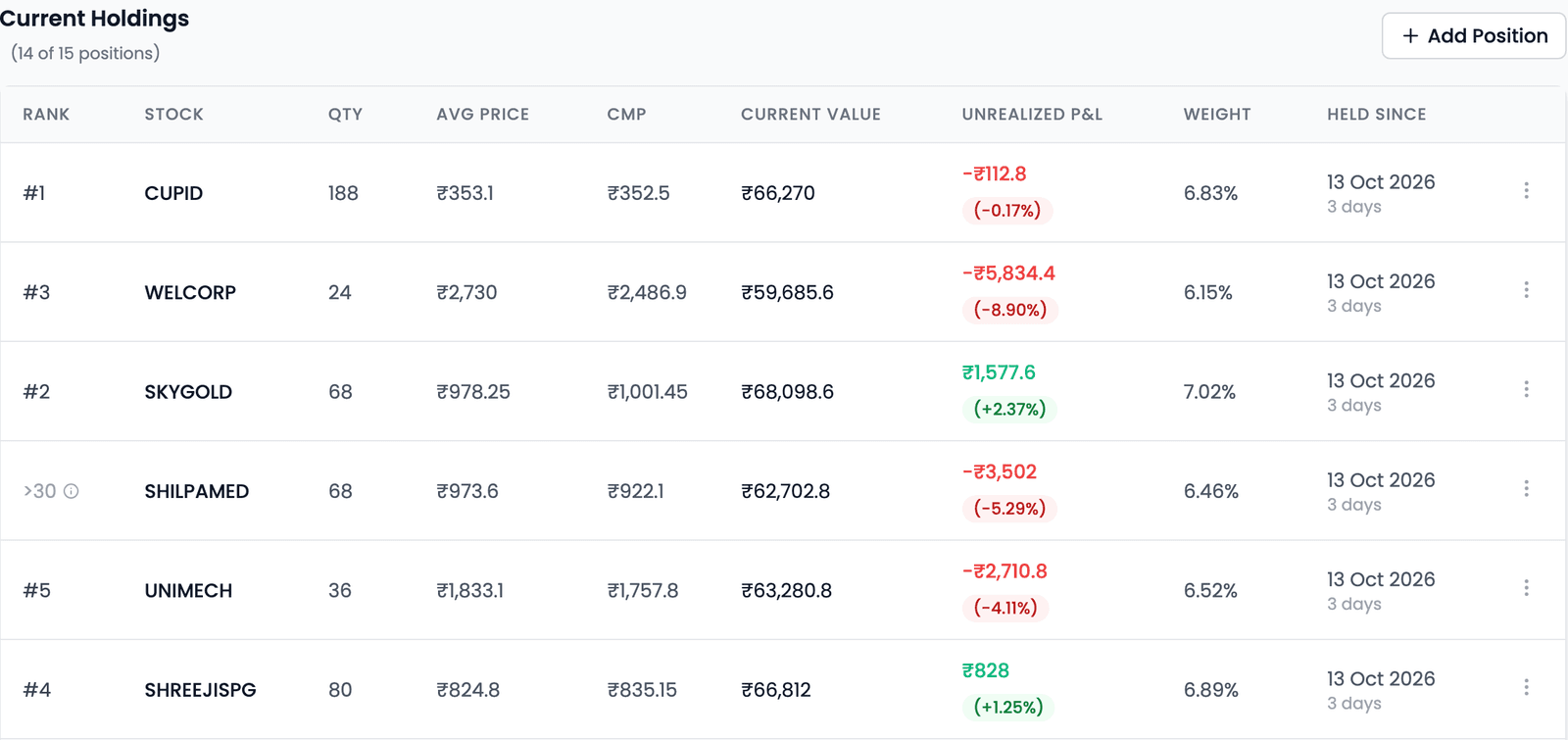
| Column | What it tells you |
|---|---|
| Rank | Where the stock ranks today under the strategy's rules. >30 (the Exit Rank), or Unranked, means it is no longer part of the latest ranked universe |
| Qty · Avg Price | How many shares the simulation holds, and the average price it paid |
| CMP · Current Value | The current market price, and the holding's worth at that price |
| Unrealized P&L | The gain or loss on the holding if it were exited at the CMP |
| Weight | Its share of the portfolio |
| Held Since | When it was entered, and for how long it has been held |
A Manual pill marks a position you added yourself; Adjusted for split, Adjusted for bonus or Adjusted for demerger marks one a corporate action changed (hover to see what changed). No pill means it came from the strategy.
A holding with no closing price since an earlier day is tagged with the last day it traded, such as Last traded 24 Oct, and valued at that close; the Trade Log shows the same tag in place of the CMP chip. An exit signalled on it waits: Scheduled Trades and the Action Center show "Waiting for trading to resume (signalled on 24 Oct).", and it can still be rejected. An entry due on a day with no closing price is skipped, and its slot stays in cash.
On a phone, each holding is a card (stock, quantity, unrealised P&L, average price, latest close, rank, value and weight, and entry date), with a sort menu: Rank, Best return, Worst return, Largest value, Newest first and Stock A–Z. The ⋮ menu on each holding and the Add Position button record what you did at a broker; see Recording Your Real Trades in a Simulation.
Trades
The Trades tab holds the Trade Log: one row per round trip, an entry and the exit that closed it, if there was one. The table scrolls sideways; its right-hand columns explain each row.
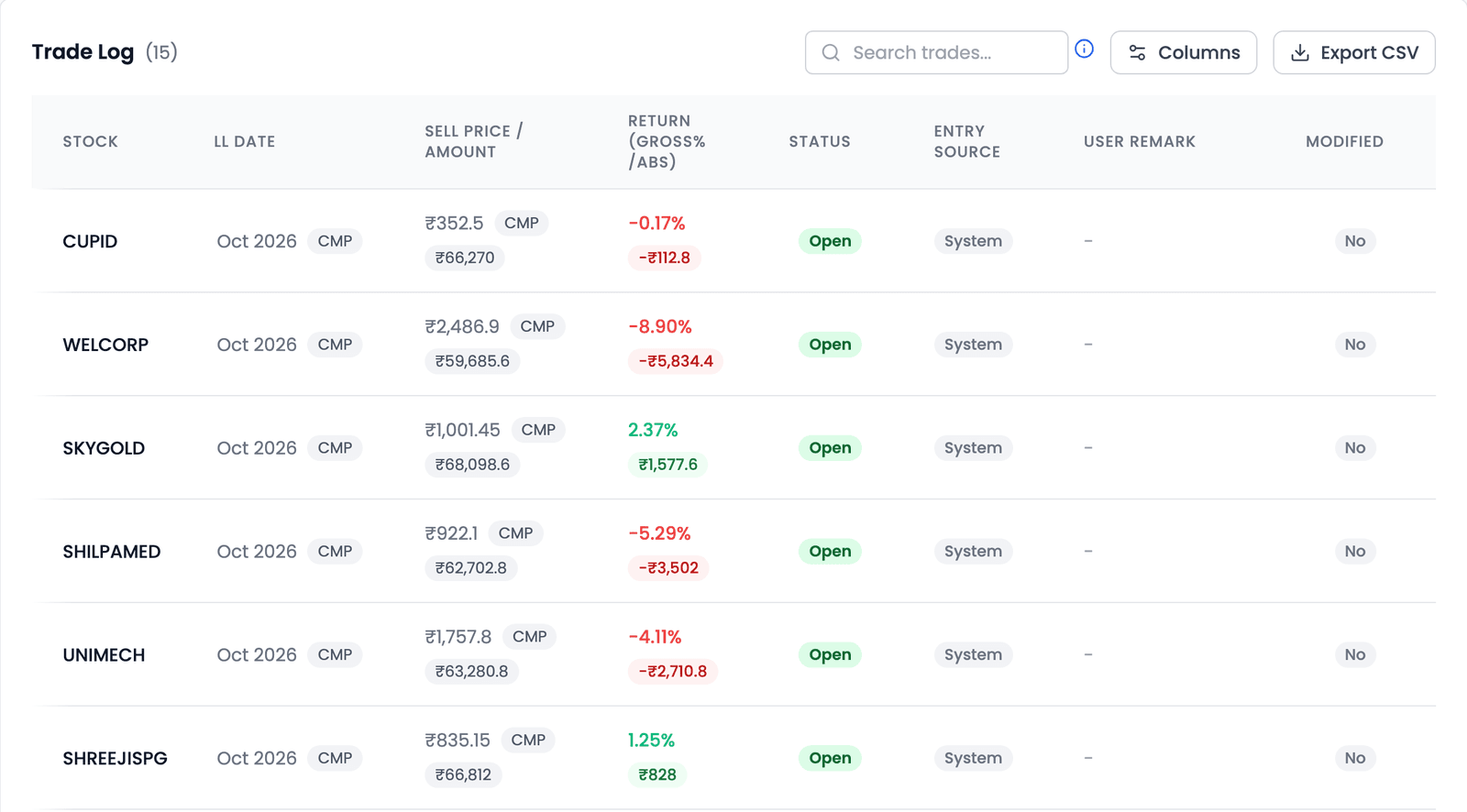
- Status is Open for a holding still held, Closed once exited, or Skipped for a trade that never ran. An open row's Exit Price is the current price, marked CMP, so its return is a running figure; a Closed row's is final.
- Entry Source is Auto, System, Manual or Execution Adjusted; positions the simulation entered itself read System, as in the demo.
- User Remark shows a note you added when recording a trade, and Modified reads Yes once you have corrected the row, for example to a real fill price. Entry Source stays as it was.
- A corporate action shows as a pill, such as Adjusted for split, or Merger exit or Delisted when the company merged or was delisted.
Search, choose columns, or Export CSV to take the whole log elsewhere.
Why a stock was entered, kept or exited
Every trade carries its reason, so each entry and exit traces back to a rule. At each rebalance the strategy ranks its stock pool. It enters the top-ranked stocks it doesn't hold, up to its Number of Stocks; keeps holdings still at or above the Exit Rank; and exits those that fall below it or fail a filter, such as a moving average or the Super Trend. Between rebalances, a stop loss can exit a holding.
On a computer the Reason column shows the full sentence: "Rank 4 of 50 — Selected" (an entry, fourth of the 50 stocks that passed the filters), "Rank 31 of 50 — Not selected" (an exit after falling past the Exit Rank), "Stop-loss hit at ₹X (15% below entry)", "Below 50-day SMA" or "Supertrend (10, 3) in downtrend". Phone cards use short labels:
| Label | What happened |
|---|---|
| Rank #3 | Entered as the third-ranked stock |
| Rank Drop | Exited after falling below the Exit Rank |
| Stoploss Hit · Trailing Stop | Exited because a stop loss was reached |
| Super Trend down | Exited at a rebalance because its close was below the Super Trend line |
| Filter Failed | Exited because it no longer passed one of the strategy's other filters |
| Opened by you · Closed by you | A trade you recorded yourself |
| Merger exit · Delisted | Exited because of a corporate action |
A trade the strategy wanted but couldn't make says why too, for example "Not enough money for 1 share" or "Portfolio full". A holding replaced with Replace Holding shows as an exit and an entry you recorded.
Cash Ledger
The Cash Ledger is every movement of the simulation's cash, newest first.
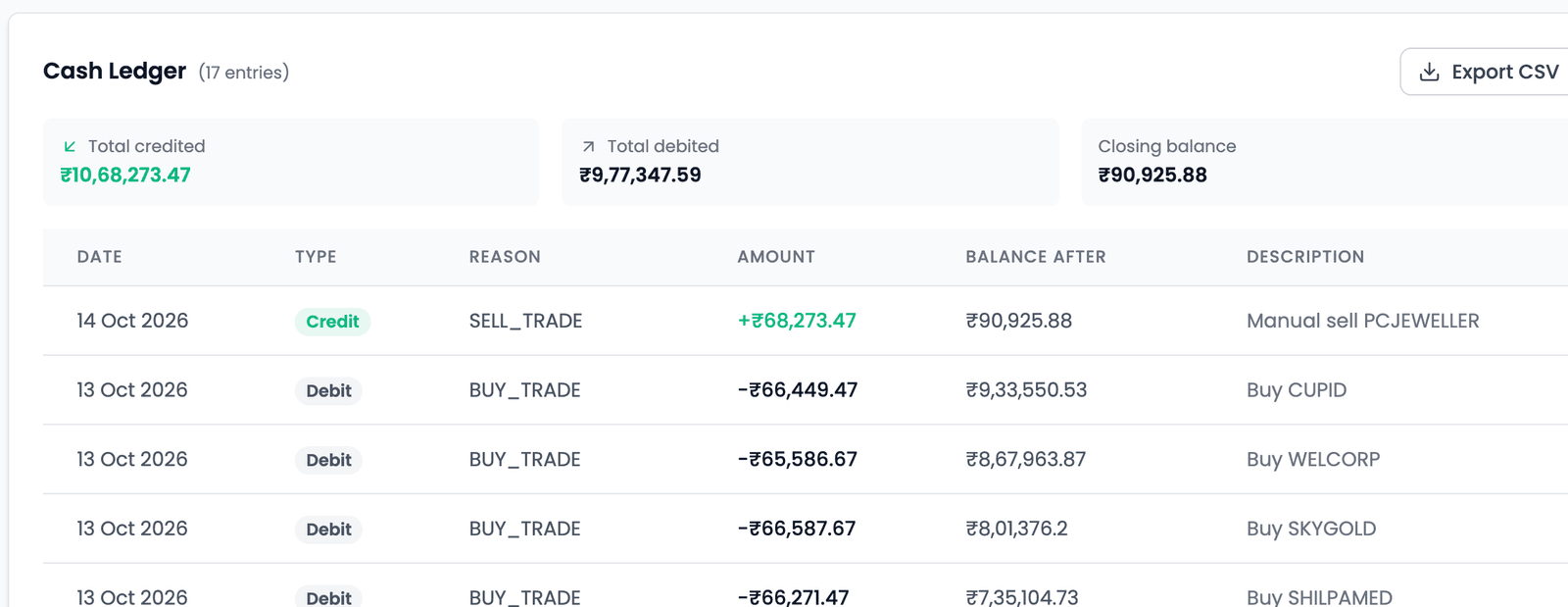
Three totals (Total credited, Total debited and Closing balance) sit above the entries, each with its date, credit or debit, reason (the starting capital, an Entry or an Exit), amount and balance after. The closing balance is the Cash Balance card: in the demo, the last entry on 3 Nov leaves ₹20,024.11, the ₹20,024 on the card. It exports as CSV too.
Configuration
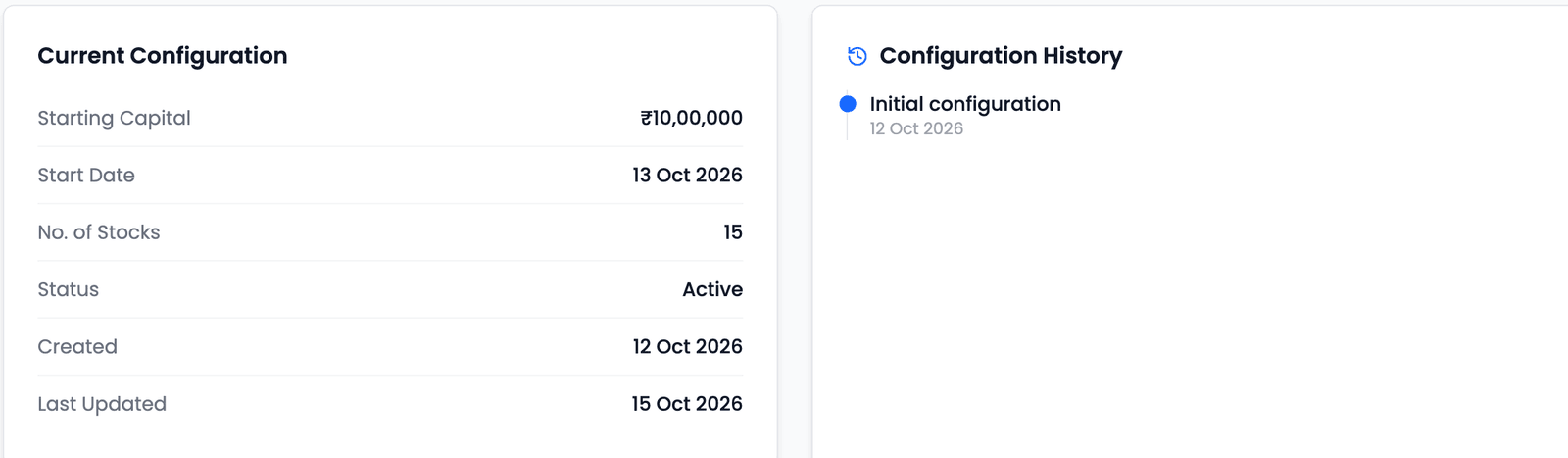
Current Configuration sums up the simulation, and Configuration History lists every change to its rules, starting with Initial configuration. Below them, Strategy Parameters shows the full rule set, such as an Investment Mode of Reinvest (no capping) in the demo, with an Edit Settings button.
Changing a running simulation
Edit Settings changes how a running simulation picks and exits stocks, without starting again and losing its history.
| Fixed for the simulation's life | Editable |
|---|---|
| Start Date · Starting Capital · Portfolio Size | Universe and filters · technical rules · Maximum Rank · rebalance frequency and day or date · Exit Delay · Investment Mode (Reinvest (no capping), Reinvest (capped at 1.5×), Reinvest (capped at 2×) or Fixed) · stop losses · Transaction Cost |
A saved change is used from the next daily update:
- Stop losses are checked with the new settings from that update.
- Which stocks to enter or exit changes from the next rebalance, when the strategy ranks again with the new rules.
- Trades already scheduled still fill as planned.
- Exit Delay, if you change it, counts from the next rebalance after you save.
Past trades and the Cash Ledger are never rewritten. Every change is added to Configuration History, with an optional "Reason for change". If a simulation had stopped updating, saving a change restarts it.
Tracing a surprise
When something on the page surprises you, these tabs answer it in order. The Trade Log's reason says which rule acted; Logs, in the header's ⋮ menu, says when; and Configuration History says whether a rule had just changed. A difference you can trace to a rule is the strategy at work, not something to correct.
Key takeaways
- Active Portfolio shows each holding's rank today; >30 or Unranked means it is no longer in the latest ranking.
- The Trade Log is one row per round trip; Status, Entry Source and Modified explain each row.
- Every entry and exit carries the rule behind it, in full on a computer and as a short label on a phone.
- The Cash Ledger is every rupee in and out, and its closing balance is the Cash Balance card.
- Edit Settings applies from the next daily update, and stock choices from the next rebalance; Start Date, Starting Capital and Portfolio Size stay fixed.
- Past trades and the Cash Ledger are never rewritten; Configuration History records every change.