

Don't just pick stocks. Build a process.
Get a starting strategy, test it on historical data, and make it yours.
Free live demo, Saturdays, 11:30 am IST · Register- Free for 3 months
- No advice
- No orders placed for you

How it works
From a starting strategy to a process you understand
- 1
Start
Answer three questions to get a starting strategy, or set your own rules.
- 2
Test
See how it would have done on historical data: gains, losses and its worst fall.
- 3
Practise
Run it day by day with virtual money before any real money.
- 4
Make it yours
Change one thing at a time until it's a process you understand.
Simple on purpose. Starting strategies follow one idea, momentum: hold the stocks that have risen most steadily, and swap them out when they stop. They use a few well-known indicators (moving averages, rate of change, the 52-week high), because extra settings mostly add ways to fit the past by chance.
Process, not tips
A tip tells you what to buy. A process tells you why.
Without a process
- You act on someone's call
- You can't see how it fails
- The first loss shakes you out
With NiveshBuddy
- You follow a process you understand
- You've seen how it handled past bad stretches
- You know why it trades
A worked example
No rules yet? Here's what three questions get you.
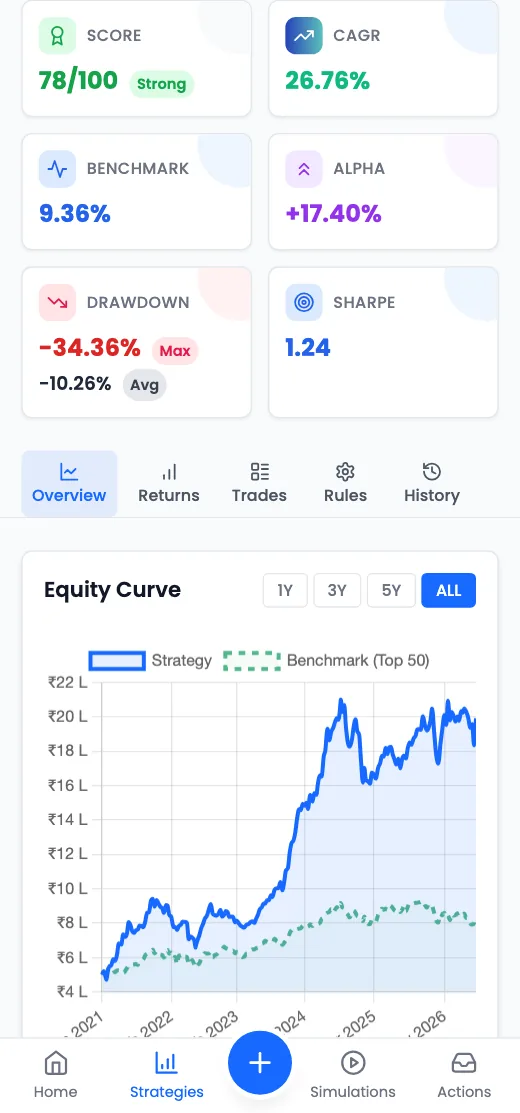
Three questions give you a starting strategy. Here is how it did in a past backtest, and how one rebalance works. Hypothetical, past backtest
1. Three questions, answered
The Top 200 companies above ₹5,000 Cr, looking at 6–12 month price trends, rebalanced on the 1st of each month.
2. How it did
CAGR
26.76%
yearly growth
Worst fall
-34.36%
Worst month
-16.45%
Avg. win / loss
20.40% / -7.43%
4 Jan 2021 – 3 Nov 2026. Gains and falls side by side. Every trade and the full history are inside the app.
3. One rebalance
Simulated trades generated by the strategy's rules. No real orders are placed.
- Company AExit, its price trend turned down
- Company BExit, its price trend turned down
- Company CEntry, ranked 5th of 112
- Company DEntry, ranked 9th of 112
Also included
Built for the long run
Clean price data
NSE end-of-day prices since 2021, adjusted for splits, bonuses and dividends.
Experiments
MaxTest many variations of one strategy in one go.
AI connectors
Pro & MaxAsk Claude or ChatGPT about your strategies, or have it create and change them for you.
Alerts
Email and app notifications when a simulation has trades to review.
From early users
What people noticed first
Backtesting showed me how my rules behaved through past falls, not just the good months. Now I look at a strategy's worst stretch before anything else.
Vansh U.Full-time Investor
I ran a starting strategy with virtual money for a few weeks before putting in anything real. I could see how often it trades and what a bad week feels like.
Sarit K.Retail Investor
Fewer settings meant I spent my time testing ideas, not learning the tool. A few clear rules are easier to stick with.
Deepak O.Trader & Investor
What it costs
Build and test your own investing process, rather than relying only on someone else's picks.
See all plansStarter
Free for 3 months, to try starting strategies, backtests and simulations.
Live demo
Join a free live demo
50 minutes on Google Meet: a walkthrough of NiveshBuddy, then your questions answered live.
- Get a starting strategy from three questions and read its results
- See how a simulation tracks it day by day
- Ask anything about the app (no stock tips or advice)
Saturdays, 11:30 am IST · free
FAQ
Questions people ask first
Do I need my own rules to start?
No. A rule is just a repeatable way to decide what to buy and when to sell. Answer three questions to get a starting strategy, then change it as you learn.
How is this different from a tip service or a smallcase?
They give you someone else’s picks. NiveshBuddy gives you the rules, the history behind them and a way to practise, so the decisions are yours.
Why is NiveshBuddy kept simple, with fewer indicators such as only simple moving averages (SMA)?
On purpose. If a simple rule does the job, more indicators mostly add things to tune. Every extra setting makes it easier to fit the past by chance (what traders call curve fitting), and a strategy fitted that way tends not to hold up later. A few well-known indicators are quicker to learn and easier to stick with, whether you’re new or experienced.
What data does NiveshBuddy use?
End-of-day NSE prices, adjusted for splits, bonuses and dividends. Backtests pick stocks only from each universe as it stood on every rebalance date, not from today’s list, so companies that later dropped out still count and later winners aren’t picked early. Strategies are built on price action (trends, momentum, moving averages); company fundamentals such as earnings aren’t used yet. Which stocks a backtest can pick
Is NiveshBuddy a SEBI-registered investment adviser?
No. NiveshBuddy is a research and strategy evaluation platform that helps you build, backtest and simulate strategies on historical market data. It doesn’t give personalised advice, stock recommendations or portfolio management.
What are a backtest and a simulation?
A backtest runs a strategy’s rules on past prices to show what it would have bought and sold, and how the money would have moved, including the bad stretches. It isn’t a forecast. A simulation runs the same rules forward from today with virtual money, a day at a time, so you can practise before using real money.
Is there a NiveshBuddy app on the Play Store or App Store?
Not in the stores. NiveshBuddy works in your phone’s browser, and you can add it to your home screen from there. It then opens like an app and can notify you when your simulations schedule a trade.